
Indie game storeFree gamesFun gamesHorror games
Game developmentAssetsComics
SalesBundles
Jobs
TagsGame Engines

VM81

68
Posts
4
Topics
3
Followers
A member registered Aug 31, 2021 · View creator page →

Creator of

Recent community posts

Here are some suggestions, based on the 30 or so minutes I've spent with the engine:

Minigame candidates: Shooting(target practice), Lockpicking, Dice, Blackjack, Fishing;

Visual effect- a dice rolling animation;

Placeholder asssets- don't need to be pretty, some stock silhouette art will suffice;

Randomness(at least the basic 1d6, 2d6 etc.) Right now I can't find a way to add 2d6+20 money.

Hotspot shapes: Triangle, Hexagon (useful for navigation and hex maps among other things)

Some(or all) of these might already be present and I might have missed them completely, but if I missed them, chances are so will other new users, so make sure they have a mention somewhere in the tutorials and the documentation.

Overall a pretty solid project though. Congratulations!
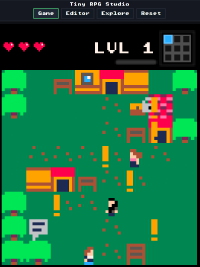
(1 edit)

I've been making games and writing about them(on and off) for thirty something years now. I don't claim I know how to make a great game, but here's a list of general design and tool specific tips(in no particular order) to help you make the best out of your tiny RPG's.

1. Game length is not an indication of quality.

"This game is boring AF, but at least it's long, " said no one ever. Not only that, but having a long-ish game without dedicated save function just sucks. The bottom line- don't maximize for length.

2. Don't try to do too much

One good quest per game is enough, but if you want to do more(and I know you do) plan for at least 3 screens for a main quest and at least 2 for each side quest to create a feeling of space and time. Ideally 5 and 3 respectively. So basically one main quest and up to 3 side quests on the default 3x3 map, since you can do some quest area overlapping. More than that and there will be way too much backtracking and it will feel like everything happens in one place.

3. Tool labels are just a suggestion

Think of it like this instead: terrain tiles are for elements you want repeated in one screen(both passable and solid). NPCs are for unique solid elements, that may or may not be repeated on other screens and/or may need to disappear.

4. Just because you can do something, doesn't mean you should.

Think if it serves your design or you're putting it in, just because the functionality exists.

5. NPCs are your quest items.

Reskin them, set a variable for later use, write a text message you picked the item, set them to disappear. Voila, you picked a quest item.

6. Reskinned NPCs can be used as extra unlockable doors, information system or temporary roadblock.

Sure we have default elements that do that, but those are limited to 1 per screen. NPCs are not.

7. You can reskin the XP scroll...

to look like your quest item so you get XP when you find it.

8. Don't go overboard with long dialogues.

If your text is longer than 5 dialogue screens(per NPC), it's way too long. Use environmental storytelling instead to tell your story- find items with telling descriptions, notes or diaries that tell the story etc.

9. Create memorable areas on the map through environmental change and unique features.

Animated sprites or reskinned NPCs are great for that. Make every room unique visually- have a clearly different layout and gameplay- the room with the lever, the room with the chest in the middle etc.

10. Your dialogue choices does not have to be a "yes or no" ones.

Just link different answers to your ✗ and ✓ options, similar to how consoles tie answers to buttons.

11. Optimize your canvas space.

Boundary wall placement depends on the entry point and your initial moving direction. Every time you first enter a room, you must see which directions are available straight on. All the walls are defined in the same room, absent walls that were already defined in the previous one or by the map outside boundary.

To make things easy for the players use "path" tiles to show possible exits.

12. Use this adapted version of the classic dungeon checklist to make sure you produced a viable RPG.

Do you have:

- something to kill (normal enemies)

- something to be killed by (boss enemy, requires leveling and loot to beat)

- something to find (loot, secrets or story segments)

- something to steal (loot you can get without fighting, just timing the enemies)

- something to tinker with (puzzles, levers and traps)

- something to talk to (a character, a sign to read or just a baloon text detailing the environment)

- different paths (or different ways to move around an obstacle or fulfill a quest)

If yes, your tiny game is just fine.

13. For narrative games don't go crazy with the characters.

A 3x3 world with 7-9 characters to interact with is enough. Yes, we have more NPC's available. No, you don't need to use them all.

14. You have enough sprites(and game elements in general) for everything.

For each environment/location you NEED just one moving sprite(to make it feel alive), one wall sprite(trees are walls) to create boundaries, one path sprite and one normal floor sprite, two normal location appropriate enemies(just one for side quests) and one boss enemy(optional for side quests). The rest are "detailing sprites" that create uniqueness, beauty and flavor in each location. Use them accordingly.

15. Music is a great boon to your game(when done right)

But make sure your music theme is good and is long enough so it doesn't get repeatable. Even a great melody gets boring fast if it's 30 seconds on a loop. If you're stuck between choosing no music or bad music, go for no music. At least that way players can listen to whatever they want while they play.

That's it. My 15 tips on making a good RPG in TRS. Ultimately though the most important thing is you don't forget to have fun and experiment :)

This will do the trick nicely, thanks!
I was trying to do it using a AND logic gate to have two conditions activate the trap and thought (incorrectly) I can make it work just by pulling back the lever, which obviously wasn't the case, since the logic gate still outputs the variable. My bad.
Not my proudest moment...

(1 edit)

Hi,
I wanted to have a trap, that starts disabled and activate with a variable(by opening a chest). No problem here. However I also wanted to disable the trap, after it's activated by pulling a lever and I couldn't figure that last part. Is that possible to do and if so, how?
I know it's a bit of an advanced topic, but the mechanic is nice, so I think it would be useful to have a written(or video) tutorial on it.

EDIT: Would you mind if I use that topic to post some short tips and tricks on general game design and using the engine? I think it may be useful to new users.

Pretty good! You need add custom fonts though, right now the contrast between high legibility modern fonts and 8x8 pixel art is jarring.

Thanks man, I'm really glad you liked them :)

No problem, glad I could help :)

Thanks. Just wanted to show it's possible to use TRS for a platformer.

(1 edit)

Hey guys,
I generally don't advertise my Tiny RPG Studio games, but since it's nearly Halloween and people are going to look for thematic games, here is something I just made. Have fun :)
/__site/vm81.itch.io/mnstr

Edit: Due to unexpected demand MSTR MNSN 2 is now live
/__site/vm81.itch.io/mnstr-mnsn-2

(1 edit)

Hey guys, it seems there is a bug with the text balloon/point of interest marker in the Extras menu. When I put more than one in a game they all default to the same text(the one I edited last). It's like they are just copies of the first one. Can you check that?

EDIT: Even though I've checked and the problem persisted on two different browsers, both on a new and an existing project before posting this bug report, I'm unable to reproduce it now.  I will classify it under "Halloween related mysteries" and will delete the topic in a few days, because I don't want to spam the forum.

Thanks man! Glad you had fun!

It should work. Just tried it. Try any 16 color .gpl palette from Lospec

The font import works. 
However the imported font looks pretty blurry in the menus. I guess it depends on the chosen font, but using something like Sofia Sans Extra Condensed renders title screen and hud elements practically unreadable.
I would suggest you allow for 2 fonts- one for title screen and hud elements and one for text only, as long as both fonts are under 1MB total. This will hopefully fix the problem with readability, but more importantly will add a title screen styling option(it's surprising how much you can say with a simple font choice) and follows the best practices of graphic design- using one font for titles and another one for text body
I also encountered a bug, where making the text bold introduced an unexpected line break and failed to load next text page, but I couldn't reproduce it, so it's not a deal breaker, just something to keep an eye for.

+1 on the Font+ idea.
And congrats on The Legend of Elda: Ocarina of Ime. It looks like it took a lot of work :)

Hey,
you can do something similar with the xp scroll. Just reskin it as a heart container, then set it to a XP value that guarantees you will get a level up, which will increase the number of hearts. I know it's not the same, but if your enemies don't give xp and the scroll is the only way to level up it will work identical to what you want to do.

Chests+ plugin proposal
Hey guys, for what it's worth I second the proposal of Luisworks Studios. It would be nice to have an option to set a variable when opening a chest. It is also a chance to integrate limited randomness in the random option, thus fixing a problem with the function implementation as it is right now.
As I said somewhere back in the topic you rarely need a truly random item drop in a small game, but it would be great if you can choose from a pre defined pool of items, for example a random sword. 
I think this can be implemented by keeping the existing menu structure, but when you mark "random" the drop down menu is still active and has "select all" as a first option and check boxes in front of every item, like an excel menu, when you use filters. This way you can control what enters the pool for the drop.
Ideally the last item in the menu will be "quest item:____" with an empty field to write a name so people don't have to use the workaround I described in the previous post.
If you implement this plug-in you can probably remove the chest random option from the core version, leaving it as a plug-in only- people who use the core are unlikely to use full randomness anyway.

Sadly it's not something you can do at the moment. However if you just want to take a quest item from a chest and you don't actually need the item for anything other than the quest(you're not using it as a sword or armor or whatever), you can reskin an NPC to look like a chest.
Then set the npc (chest) to disapear. Then in the dialogue write that you take the item and set the variable to whatever you want. 
That's how I make my quest items. 

Music+ suggestion
Hey, since you already made Sounds+, why not add a Music+ too. The idea is to let people assign a different music theme for every screen. This way they can have a thematic background music, dependent on location- cozy for safe tiles, action for tiles with lots of combat, creepy for dungeons etc.

(1 edit)

Well, as far as I can see the respawning works as expected.  So, nice job on that!
As for the Enemy+ on timers, that would be nice, but I don't see it as a high priority- the respawn as it is covers 90% of the use cases.
Timers would be useful if you can use them for both first spawning AND respawning, but even then these mechanics(spawning/respawning) are better served tied to a variable, similar to how you can unlock a number of chests or disable traps with one variable. In my experience trying to time when to do the respawn is much harder, then just tying it to a sub boss death(for example). And spawning would allow for putting more powerful enemies at play when you have cleaned a certain progress point in the game. 

The only serious plus of timers(compared to variables) is they would open the possibility to make arcade style games, if they allow for short respawn times. 

And thanks for the nice words- they are much appreciated :) I don't mind helping out with some advice but you're getting close to the point where you'd either have to rework core mechanics like combat(which work good enough) or start adding things outside the scope of a small engine.
But hey, if you decide to make a Tiny Visual Novel Studio or Tiny Arcade Studio engine I'll be happy to help on those too :)

Enemies+ or another core functionality
Hey guys,
I honestly thought I'm done with the suggestions, since the engine is really solid now, but when I reviewed the functionality of the engine I found there is one major thing we're still missing- the option to spawn or respawn(or both) enemies.
There are a lot of ways to implement this- a dedicated "enemy spawner" tile that creates an enemy of type X every Y seconds. A simple switch under the enemy, that adds an option to respawn enemy on screen load(normal enemies only, not boss enemies) or my preferred variant- a drop down menu with the variables right above "On death activates the variable". The dropdown is "Activated by variable". If you choose "none" which is the default, the enemy works as normal enemy. If you choose another variable the enemy is "off" when you start and appears on map only after variable is activated. 

Why: Spawning and respawning enemies is a key design pillar for action orientated  rpg games since the beginning of the genre.  It's something that is especially useful, when you try to make a "big" game on a very small map, since by default this requires a lot of backtracking. Backtracking on entirely empty map gets boring pretty fast. It's also really useful if you plan to make a game where you hit the maximum level on a 3x3 map- sure you can dial up the XP rewards and do it this way, but the far better way would be to "spawn" harder enemies, based on your progress(activated variables). Never suggested it until now, because I generally dislike respawning enemies. That however does not mean they're not super useful as a mechanic :) I believe it's important enough to be a core functionality(and not a plug in) but as always, it's entirely up to you.

Also you may want to check if the  "On death activates the variable" label that takes two lines now won't fit on one line if you shorten it to "On death activate variable". I think it would. Not a big deal, but it would look better.

Best,
V
(2 edits)

More plug-in suggestions
Great work on the first party plug-ins so far.  You actually beat me to Variable+. I was going to suggest it in this list. Anyway here are 4 more suggestions, plus one more that can be either a plug-in or a core functionality. I think the second will be better, but either way would be fine really.

Canvas+

Allows changing upscaling canvas(screen) size from 8x8 sprite size up to 16x16, similar to how Maps+ works. Sprite size remains the same(8x8)

Why: While it fixes the same problem as Maps+ (giving you a bigger map) it fixes it in an entirely different way. It would be great if you want to create maps, where the screens don't feel crowded while you still keep the accessibility of the 3x3 structure, which is great for keeping a mind map of the area while playing.

Sprites+

Allows increasing the sprite size x2 from 8x8 to 16x16. Canvas remains in proportion, as in 8x8 sprites.

Why: This will allow people to use the huge amount of free 16x16 sprites available to make their games. I like making my own sprites, but many people don't. Sure it's going away from the core engine concept, but that's why it's a plug-in material and not a core function.

Sprite import

As the name suggests allows you to directly import a sprite in place of the one you have, as long as it's the same dimensions and uses the same color scheme.

Why: It's mostly useless with 8x8 sprites, since you can redraw those in seconds, but if you|(or somebody else) makes Sprites+, the sprite import would be useful.


Economics

Create one new base stat(money). When set on an enemy unit, it's the amount you get from defeating the enemy. Can be found in chests. Basically works like the XP scrolls. 
Create one new NPC type- Vendor(under others). When setting a vendor you have drop downs to pick which items he sells and value boxes to choose the price.
Why: It's mostly useless for 3x3 games, since there are other ways to do that. It would be great for bigger games. 


Teleport

This is the important one. Create a set of markers(teleport1, teleport2). Stepping on the first one moves the player to the second one and vice versa. Ideally there will also be check mark to make it one direction only(when checked) and an option to activate it by a variable, leaving it dormant otherwise. Even if it's limited to 1 per game it would be a great addition. Ideally it would be more(3-5). 

Why: Teleports and "doors". Never suggested it until now, since it has limited use in 3x3 maps and adds complexity, even though it's nice to have. Still you can leave 1-2 screens for internal locations, and use teleports to enter them. But since we have logic gates, that are significantly more complex to use for the non coding community, why not? Plus with bigger maps like 5x5 it would help decrease backtracking and can be used as a "door" for dungeons and other internal locations.
Edit2: Allowing for the "teleport" to also be activated by variables("none" is a default activated state)  would allow for creating quest and gameplay loops like "collect those ingredients to activate the magic circle" or "skip that (boss) room", because you did a side quest... the possibilities are huge.

Best,
V

Edit1: Formatting
Edit2: Edited the last lines for clarity.

Did not have time to test extensively, but from what little testing I did Maps+ seems to work fine.
Out of the other ideas Dialogue+ is probably the most useful. If you end up implementing any of them and I end up testing them, I'll drop an edit here to share my findings.

Amended proposition on character import/export + a few thoughts on plug-ins
Ok, you know how I proposed to have character import/export, so you can build bigger adventures based on episodic structure...
I gave it some thought and I think the laziest way to have something like that is to allow the users to set character starting level/experience manually, similar to how you can set xp given by enemies. If the games are designed with the same tileset and you use the same skill progression, this would probably work good enough to create interconnectivity between games without real character import/export. This way the only inconvenience is the need to choose your skills again to "continue" your previous adventure. You don't really need to import items(and have dedicated import/export menu), since those are consumables anyway and would make sense you might have used them or sold them or whatever between "quests". It would also allow you to start a game with existing skills as someone else requested a few months ago.


Now on other topics:
I can confirm wooden signs and dialogue bubble are fixed. Thanks!

I also saw you integrated a plug-in support, so I'd like to suggest some first party plug-ins. Note that I have no idea if those are achievable with the plug-in system you implemented, so the suggestions might be absolutely useless. Still:

Maps+

allows for selecting a custom map size within reason, for example up to 5x5. Allows for non square maps, 3x5, 4x3 etc.

Why:  I agree 3x3 works great for a 5-15 minute game, but it just seems like a missed opportunity not to have that as an add-on. Bigger maps would allow for better games- more quests, better zone segmentation, longer gameplay etc. We've discussed it all before. It may also make the engine a viable prototyping tool for bigger projects like RPGM games, since it's extremely low friction and easy to use.

Visuals+

Move some of the baked in functionality in a plug-in. Namely the tile animation, tile effects and tile merging. 

Add 2 frame animation on NPC's, enemies and items too(optional, dependent on engine capabilities)

Why: The tile effects(especially the water, lava and embers), the tile animations and tile merging effect are nice and easy to use, but I think they add significant complexity for the new user and strictly speaking are not key capabilities, even though I personally use them a lot. I've spend a lot of time in the editor and yet I always forget to copy the same tile on the second frame or draw a blank when I try to remember where to find the effect set-up menu (the one where you combine and name effects). And most people don't even use the animations. So I think moving them into a plug in makes sense to simplify the interface while still keeping them.

Stats+

Allows for editing enemy and weapon stats, not just xp.

Why: It would be great for the people who want to create something entirely original and finetune every aspect of it without adding extra features most people won't use in the base version.

Dialogue+

Allow for more alternative dialogues with one “disappear” checkbox per dialogue as you were considering earlier.

Why: It would not only allow for more ingame dialogue reactivity, but for all kinds of design tricks in situations where you use npc's as reskinned quest items or dialogue markers.

I really hope the creator(s) are well.  They just disappeared.
I'm also a bit bummed they never uploaded the versions between 1.9 and 1.99 though. Even if they're stuck on 2.0 for some reason, the functionality in those unreleased versions was well worth it.

This is huge!

You actually have the tiles to create one good looking environment now. It's probably the biggest upgrade to the engine since the new combat system. 
The upgraded XP scroll functionality and the fix to the "!" problem are nice too.

If you have a "to do list", please add fixing the speech bubble and the wooden sign movement to it. Right now they behave like a npc's, turning left and right with player movement, which in my opinion just looks like a bug. Both should be static. I always edit them manually to be symmetric, otherwise "text lines" on them change sides.

You might also want to explore the possibility of adding a 2 frame movement animation to the characters(mc and npc's) too. While it's certainly not a must, it generally brings a lot of life to a game visually. I have no idea how it would impact performance though.

All in all a great update(and upgrade) to the engine!

Amended proposition on text notifications

Hey, 

I know you're still working on my previous series of proposals(and their numerous edits), but I wanted to make an amended proposition on text notification size. 

In the post script of my previous suggestion list I proposed to decrease the size of the "!", denoting unread dialogue to about half the size(5 pixel high, 1 pixel wide or the upscaled equivalent). The problem is even if you do that (and you probably should unless you can think of even less intrusive notification) the screen still becomes way too crowded when you're doing a narrative game with lots of characters. See example bellow (in-game mockup).

Notice that not only the notifications are overlapping some of the assets like the house on the top right(twice), they are also overlapping the "locked chest" icon and due to their size are domineering the scene completely. Note also the sign at the top does not have a notification or to be precise it's not visible, probably because it has to be rendered offscreen . Either that or because it's the same color as the stock wall.

My proposition is to have a checkbox "disable new text notifications" under Development side menu. This way they can be on with games with little dialogue, and off, in dialogue heavy games, where you're supposed to talk to everyone anyways.

Best,
V.


(4 edits)

That would be a short one:
1. Wow, that was fast! Tested it, seems to work fine. I would propose you add more skills to round them to ten (for example Leach- recover one HP on enemy kill if life not full) or even a dozen, but otherwise things look great.
Edit2: You should really put somewhere a note how much XP you need for each level. Otherwise it's a trial and error thing.
Edit3: Think about implementing the option to choose how much XP is received by an XP scroll. Right now it's unclear how much you receive and it makes very little sense to be able to assign a value on enemies, but not on the scroll.  If you implement this it will be possible to make a game where you receive no experience by defeating enemies, but by finishing a task(where you receive an XP scroll on completion).

2. I did not explain the image part as good as i should have. By image I mean a pixel art image. Something like 64x64pixel png file with limited palette, which would keep the retro feel, be in line with your faux screen resolution and doesn't blow up the game size. I love how everything is encoded in the url, so I wouldn't want to make it too big either :)
3. Tested, armor seems to work fine, maybe just introduce a second set at some point.
4. I think 4 would be enough, if you make it one of each type: one normal, walkable, one animated, walkable, one normal non walkable(wall type) and one animated non walkable. This would actually increase variety in levels immensely.
Edit4: Another thing you can do is putting a checkbox "walkable" under the pixel art editor under the "Merge with adjacent tiles" checkbox. It would serve two important purposes- first, it would make obvious at a glance for new users whether or not the tile is something you can walk over on the map, because sometimes it's not clear. Second, checking or unchecking it would allow for users to repurpose walkable tiles into non-walkable tiles(and vice versa), giving you more tiles of the type you need(not every map requires equal amount of both) without increasing the total.

As for using NPC's- yeah it's a nice workaround(sometimes). I use them as collectable items :) It's too bad they are limited in use by the fact that you can only mark them to disappear after the first dialogue.  Would have been very useful if that was available after the alternative dialogue too. 
Oh and nice game BTW(the one you linked)
5. Thanks. I was trying to think of a way to make a slightly bigger game, without changing the 3x3 map grid (which I generally like). I came with the idea to use a simple .html page as a level selector but the fact I couldn't move experience and items between the levels put a damper in it.

PS: Would it be possible to decrease the size of the "!" that shows a point of interest in game (new dialogues)? I get it's a good size for visibility, but it's absurdly big right now- it's almost as big as the default character sprites and actually bigger than the ones I'm using right now. Perhaps keep it 1/2 of that size, but give it an effect or 2 frame bobbing animation to make it stand out...

Edit- fixed an error
Edit2- Added a suggestion on XP leveling requirements
Edit3- Added suggestion on XP scrolls
Edit4- Added suggestion on tilesets. Edits are now bold for clarity when reading.

Hey,
I made a quick review of the engine as it is right now and have some(more) thoughts and suggestions:

1. Experience system and skills changes. 

It may be just me, but it feels like you gain levels way too fast and you get skills way too often. That's not a huge problem, but is a problem nevertheless. 

What is a real problem is the fact we don't have enough good(useful) skills- assuming you get to level 8 you would have taken 4 out of the 6 skills and considering two of those are very situational and may be entirely unusable in a game, depending on the design, it means you've actually taken all the useful skills at that point. It's not a question of if, but a when.

To address the overly aggressive level gain, I suggest to have a checkbox to disable experience(and leveling) altogether, like we have for the skills, under the Development menu. This way people can design around item progression instead of level progression, if they want.  Keep in mind you don't actually need experience system for narrative games, so having an option to disable experience(and leveling) makes sense from that POV.

As for the skills system, I'd give skills only on levels 3, 7 and 10(instead of 2, 4, 6, 8, 10) and add at least 4 more perks to chose from, thus creating a real perk pool.

Here are some skill sugestions:

Cautious: Pass through traps without taking damage. (boots in skill form)

Booksmart: XP scrolls give you 4x experience.

Blackmith: Your equipped weapons have +1 durability.

Stealthy: Each time you enter a room you're invisible to enemies for 5 seconds.

Blessed: You get +1 max HP immediately(+1 heart)

Note that adding enough extra skills should fix the skills allocation problem even if you keep the current skill reward interval(every other level) intact as long as you have an option to leave some skills unallocated(out of the pool).

2. Create Title screen and Game intro as optional elements under the Information tab.
I mentioned that some time ago, under the "wall of text" suggestion. This is an amended proposition, including some new elements(title screen) and more details on how I see it working(under Information tab etc.)
+Title screen(optional field)- upload image to show game cover before you start the game. Clicking the action button on the title screen starts the Game intro(if any) or goes straight to game if no intro present.
+Game intro(optional field)- a full screen text box, that works like normal text box(font size, line control font control etc). When text has finished showing, clicking the action button starts the game.

I believe those two will create a feeling of playing a real retro game.

3. Rebalancing items.

Right now the armor is basically a god mode cheat. I propose you make it behave more like a weapon(give it a durability of 5 hits). Create another peace of lesser armor with lower defence and durability of 3. Since we don't have control over individual item stats,doing so makes a lot of sense for item diversity.

4. Adding more tiles

So far every time I tried to make a tile set I came one or two tiles short of my idea. What I propose is either adding at least one more tile per type(walkable/solid) or putting a switch on animated tiles, so they can be used as static ones. Yes, I know I can just make the two animation frames the same, but it feels wrong to do it this way.

I would also propose adding one tile with a higher z index, alowing the character to pass under it or to have a chest or item under it. It's great or hidden passages or hidden loot- you just leave a few spots transperant to show the path or item under it and voila.

5. Character import and export
Ok, this idea is really undercooked, but it should be possible to export character stats and inventory and import them in another adventure. Just something to think on.

Wish you all the best,|
V.

Sorry for the slow reply, I was on a family vacation.
1. It's great to have a visual indication when a chest is unlocked by variable. This way you can easily see something has changed. My problem with the implementation is unlocked chests(the ones that were unlocked by default) also start with the exclamation mark. Thus every chest starts up with the exclamation mark, unless it's locked and it muddies the signal so to speak, because now you don't know whether the exclamation mark is there because you did something, or the chest was unlocked by default.
2. I can confirm it's removed.
3. When loading the game file in the editor

Hey, I wanted to update one of my old projects with some new features, so I loaded it in the editor and did some edits. I noticed some unexpected things:
1. There are exclamation marks next to all my unopened chests(see attached image).
2. When the final boss is defeated you still get the "demonic seal" text. I thought that was removed in newer versions. Do I need to remove and put the boss in again, so it doesn't show?
3. I had a loading error, accompanied by a short text in what i guess is Portuguese(sorry did not capture that)
You can find the game at: /__site/vm81.itch.io/the-amulet

Default -> alternative -> choice is indeed the better choice if it's not breaking compatibility.
The implementation of “✔/✖” works great, but maybe put the checkmarks in green/red too. While those are mostly universal I seem to remember some countries like Japan use both ✔ and ✖ as a negative(as in "incorrect"), so putting them in green and red respectively should help clear that situation(if it arises at all- I might be wrong about the whole Japan thing).
Anyways, great work. The engine turned out pretty nice and while some elements like the reward systems can use some light rebalancing I can honestly say I'm pretty happy with the result. It's by far the best small RPG engine out there and definitely the most user friendly one.

Fair enough. I agree with your on that one. 
Any thoughts on the "dialogue, choice, dialogue" order and  the "✔ / ✖"?

First off, great work! I was about to suggest you implement it on NPC's too, depending on how it works, but you beat me to it :).

Now, it works great for the balloon, but I would suggest you change the order of execution for the NPC's if possible. Right now the disappearing option happens after the first dialogue is complete. It should happen after the last dialogue. This way you can have an NPC talk to you(or give you a task), react to what you did and then disappear, it's a small difference, but an important one I think, since it allows for extra interaction with the same NPC.
While on the topic of NPC's, there is also the thing about the "alternative dialogue" and the "yes/no dialogue". Right now if you have all 3 the execution is Dialogue 1, Choice, Dialogue 2. But in the editor it's 1,2, choice. So I propose either fix the order of execution, so the yes/no dialogue is the last to execute or change the order in the editor to make clear things go in that order. Probably the second one otherwise it may break something.
Oh and about the "yes/no dialogue"- I know I was one of the people suggesting it in the first place, but I think  it turned out a bit too limiting the way it is. What I suggest is changing it to more general sign of acceptance/denial. Something like ✔ and ✖ (or 👍 and 👎), while keeping the green and red border of the buttons intact. It shouldn't brake any existing games and would open possibilities for(slightly) better dialogues and quests in future.
So to summarize:
Balloon is great!
NPC's might need a change- disappear after last dialogue.
Might want to: rearrange order of actions in the editor,  change "yes/no" for "✔ / ✖"

I'm sorry if it seems I'm just waiting for you to finish one thing to hit you with another suggestion or request. I really appreciate all the work you're doing, I just want to make sure the engine is as good as it can be. 

It seems to work fine. As for the character's limit it was not a must. Just thought it would work good with your minimalism concept :)

Proposal on fonts and text boxes

Hey guys, 

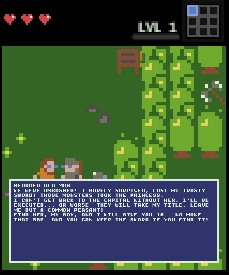
I think you really should do something about the fonts and the text boxes. A friend recently sent me a screenshot of one of my dialogues(not attached), thinking it was a bug. It wasn't but it looked like one, because the text box in mobile view shows way too little text. At the same time the text box in the desktop view shows way too much. I've attached screenshots of the same dialogue in both views, and the comparison speaks for itself. Not only the text windows are way too big, but one shows literally two words while covering the characters, while the other serves a literal wall of text(which is a bad design choice, but that's on me too).

Anyways, I would propose the following changes:

1. Decreasing the font size in mobile view to about the size of your system font(the one you use to write the "LVL1" text in the attached photo). Increasing the font size in full screen to the same font size as the system font(see above).

2. Decreasing the size of the text box to show a maximum of 4 lines of text, thus making sure it does not cover half the screen. The overflow text goes to the next text box. No idea how your code works, but I think the simplest way to implement this will probably be just to put a limit to the number of characters shown in a text box to 64 or so. Note I don't mean limiting the whole dialogue to 64 characters length, albeit some character limitations(like 256 or so characters) on the amount of text you can write in one dialogue might be a good thing to discourage bad design choices(see above) and will be in line with your minimalist design principle.

3.Assigning a keyboard symbol for flow control- assigning a symbol that's not normally used in speech, like "\" to signify "page end", basically moving the following text to the next text box. It would allow for text control when needed for design purposes.

Even implementing only the first point will go very far towards mitigating the problem, but if you're looking for interface uniformity, you should probably think about implementing some version of all 3.

mobile view

full screen

Revised proposal on fixing the in-game information system( a.k.a the balloon).

Right now the speech bubble( the Balloon in the Extras menu) works exactly as the Wooden sign, which makes it completely redundant. In the same time there is no method to serve one time gameplay or environmental info without crowding the map. 

What I propose is changing the balloon to behave more like the chest- activated only once, is walkable after activation. It also needs to visually disappear after activation(so it doesn't crowd and create confusion). Might be enough to set transparency at 100%. That's more or less my old proposal. The new part is to add the option to make it appear by variable(similar to how the chest may be unlocked by one), only your starting state is disabled(walkable and transparent).

These changes would allow for hints or environmental information without taking up walking space, which is already at a premium.
So for example you can create enemy taunts(like Firefrog requested) or disperse all types of ingame information about points of interest(like I did for the rat lawyer in my first game). The "activated by variable" part would allow for puzzle hints(for example what changed after you activated a lever) and custom "you defeated all enemies..." messages(yeah I know we just removed those, but they were s good idea in general, just not the way they were implemented).

That was fast!  Good job.

Yeah, I'm with you on that one. Maybe remove the "land is cleansed and your life-force swells" text too. It sounds nice if you're making a sword & sorcery dungeon crawler. It makes zero sense if you've just defeated the only two rats in a narrative rpg, that are there just to make the gameplay a bit more dynamic.

Hey,

I have a revised proposal on renaming enemies.

A few people(myself included) have requested in the past for you to implement a way to rename enemies, but as far as I remember we see the enemy name outside the editor only in the end game text, when killed. 

So I propose an easy fix- change the end game text when killed to not show what killed you.

So insted of seing "killed by skeleton" when you have reskinned the skeleton to a gelatinous cube ingame, you just get a "You Died!" text.

Accidentally it also takes care(to some degree) of the desire to be able to assign individual enemy stats: We already have a decent variety of enemies stat wise, so if one wants a skeleton with higher stats than the default ones, one can reskin the stock assets. If nothing outside the editor says that's not a skeleton, it's all fine.

It's a lazy fix, but I believe it will fit nicely with the minimalist philosophy of the engine and besides sometimes less really is more.

They seem to work as expected. That opens a few new gameplay options(pseudo fetch quests) and declutters the maps a bit. Great job!  But you know what they say- the reward for a work well done is more work :)
I would suggest you open an official "bug thread" and official "post your games here" thread.  Gamer735 is doing a good job on both fronts, but still it wouldn't hurt to have a place where to post things without spamming his threads.