Indie game storeFree gamesFun gamesHorror games
Game developmentAssetsComics
SalesBundles
Jobs
TagsGame Engines

VegeTato

1,454
Posts
3
Topics
438
Followers
19
Following
A member registered Mar 25, 2021 · View creator page →

Creator of

Recent community posts

我建议先从 GDevelop 官方 YouTube 频道的教程播放列表入手,那里涵盖了你需要掌握的所有基础知识。之后,你就可以着手开发更高级的功能了,比如物品栏系统。不过,无论你想构建什么高级系统或机制,最好都将其拆解为若干个小模块。以物品栏系统为例,我们可以将其拆解为以下几个部分:

1- 物品栏 UI:玩家如何打开和关闭物品栏(例如通过键盘按键)。

2- 玩家拾取物品:例如,当玩家与地上的物品发生碰撞时,将该物品对象的名称存入一个结构体变量(structure variable),然后删除场景中的物品对象。

3- 加载物品栏中的物品:例如,玩家按下按键打开物品栏,在物品栏槽位中创建物品对象,而该对象的数据正是基于之前存储在结构体变量中的信息生成的。

总的来说,构建任何系统或机制都没有唯一的标准做法,通常有多种实现途径,具体如何构建完全取决于你。如果你感兴趣,可以看看我的“2D 制作/合成模板”(2D Crafting Template);该模板包含了我在上文所述的物品栏系统(即利用结构体变量存储物品),同时也包含了宝箱等许多高级机制。

所以,你只需要掌握 GDevelop 中变量、条件、动作和表达式的基本用法,就能轻松构建出属于自己的物品栏系统了 :)
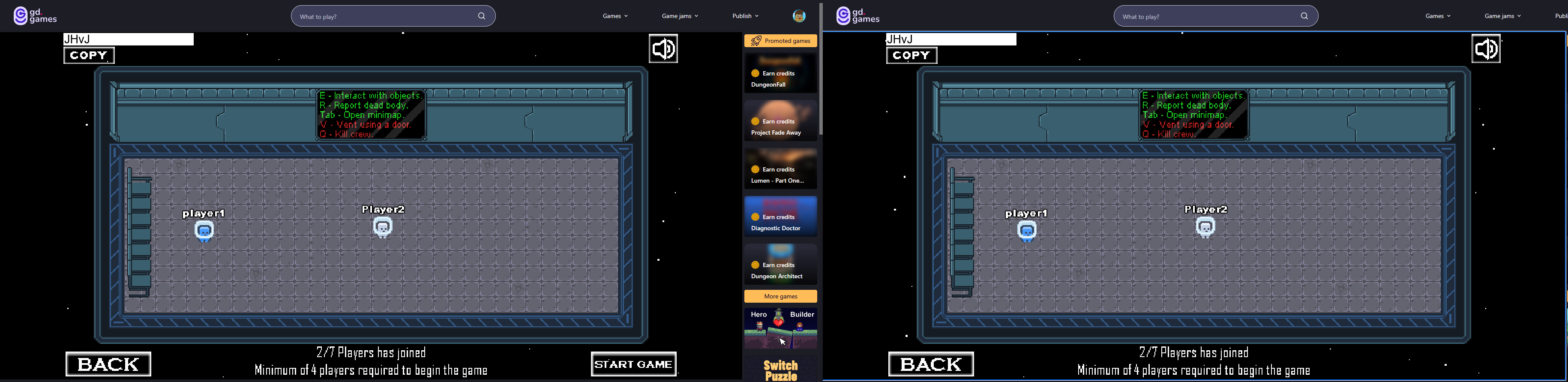
Its working fine on GD.games as well

My guess is: You can't join because the host lobby is auto closing when the host window is not focused, here is how you can join without any issues:

1- Open 2 separate tabs and open the game on them.
2- Enter the host and set host private lobby, while the other player hit join.
3- When the other player is in the (enter the host ID), make the host exit and create a new lobby, then enter the host new ID and hit Join.


You don't have to worry about this issue btw for players because each player window is focused anyway, but for testing you need to do that steps.

For more testing, you can also avoid all this steps and simply enter the game form 2 different devices and join the host without any issues.

It works perfectly fine:

Make sure you got the latest template update, because I pushed a joining rooms bug fix long time ago :)
To get the latest update, just download the template again from its itch page, or GD store.

wow that looks super polished! 🔥

是指增大 Sprite(精灵)对象的尺寸吗?

你说的“背景图像”是指 Panel(面板)类型的 Sprite 对象吗?

GDevelop 中已经有“改变尺寸”(Change sizes)这一动作,你可以用它来实现这些操作 :3

感谢您的购买 <3

请详细说明一下您的扩展构想,例如您是想调整游戏中某个特定精灵(sprite)对象的大小吗?

(1 edit)

You're welcome <3

Good luck in your smash bros game! 💪

Happy it works!
Thank you again for your support, ill keep making more templates for sure <3

Hello, thank you for your purchase <3

About the issue, most likely you changed the template conditions for the boss events, which is causing this issue, please check the template original events and watch how we set the conditions correctly, the boss shooting events can be found here:

Game scene events → Bosses mechanics → Fire wizard boss → Movements → Shoot fireball.

Boss keep firing bullets more than 3, means the object variable (NumberOfShotBullets) is not being increased, check the boss events:
Game scene events → Bosses mechanics → Fire wizard boss → Movements → Shoot fireball.

This condition and action are the one making the wizard shoots 3 bullets only, make sure you have them

As for boss not teleporting if his health got to 70 or lower means the object timer "StandStill" is stuck, double-check your events:
Game scene events → Bosses mechanics → Fire wizard boss → Movements → Shoot fireball → make sure the start timer "StandStill" action is in the event.

I recommend copy-paste the boss events to your project to avoid all kind of bugs.

Hello :3
All of this is basically CSS  :)

This video should teach you what you need:
https://www.youtube.com/watch?v=EcqIBIEUYXY

am looking at the background in your screenshot, thats not the main menu scene, thats the game scene, in that case you need to do the same steps but in the Game scene events:

Game scene → Buttons → Controls → Controls buttons mechanics → Create buttons text → change 11 to 12

(1 edit)

Hello :3

No worry the solution is easy :)
Go to MainMenu → Buttons → Controls → Controls buttons mechanics → Create buttons text → change the number 11 in the condition to 12 or to the number of the buttons you have, by default they are 11, if you added one new button then make it 12, if you added 2 new buttons then make it 13...etc, this should fix the issue :3


Sure when your game is out i can take a look :D

Ty <3

For the new game and continue buttons, for sure, you can make them act however you want, you can find their events in Main menu scene → Buttons → New game and continue.
Currently, both buttons create TransitionToGame object and play it, and in New Game events you will see that if that transition has finished it change the scene to Game, You can easily change that by creating another shape painter object and name it what ever you want (Transition to New scene for example), then in new game events rather than creating and playing the TransitionToGame you create and paly the new shape painter object which will  take you to the new scene you want (keep in mind the New Game button will also delete your data and make you start the game from 0, if you don't want that then you can remove the Delete storage action from the event).

As for the rework, it looks amazing great job ! 💪

ohhh thats an OR issue in gdevelop, i dont have that issue though, please double-check you are on the latest version of gdevelop:
Hamburger icon → Help → About GDevelop → Check for updates.

(1 edit)

Oh thats weird, can you create a complete new empty project and see if your gamepad is working in that project ?
For me its working perfectly (gamepad buttons not the analog stick one though, analog stick need other conditions), when i press the left button on my gamepad the character moves to left perfectly, the gamepad identifier for me is 1.

If its still not working, close gdevelop and disconnect → reconnect your gamepad then open gdevelop and open the game and see if it works.

Thank you <3

Yes i use a lot of pixel art :3
You can resize and reposition everything, however, there are many numbers you're going to need to adjust, not that hard though, but still it's not a few clicks, though you can also use the Ctrl+f method to search for the number and replace it with the new number this can help as well.

(1 edit)

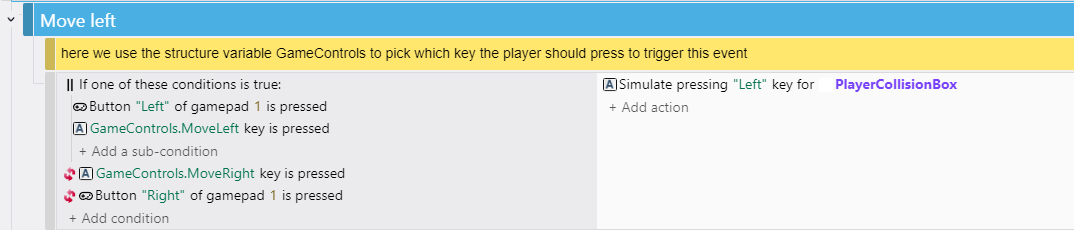
Yes that's the right place for the OR, but you need to set the correct conditions, like this:

So, IF gamepad left button OR keyboard left key is pressed, AND the right keyboard key and right gamepad button is not pressed, Then move Left.

Note: The Inverted conditions are NOT inside the OR condition.

(1 edit)

Many of my templates supports PC and Mobile :3
But for Platform Fighter, it doesn't support mobile, however, you can easily throw mobile button objects and put them on UI Layer in the game scene, then in the events, so add the mobile button is pressed inside an OR condition in the control events for the player, for example:
OR
- D key is pressed.
- RightMobileButton is pressed.

Action:
- Simulate moving right to player.


I will keep that in mind though for future tutorials on my YT channel :) 

Happy to help <3
If you have any more questions, do let me know! :)

Hello :)
Thanks for your interest in using my template :3
Unfortunately, the answer is no.
Because F-Droid requires the source code of the applications to be made publicly available, releasing the game there would violate my licensing terms. My license allows you to build and sell finished games based on my template, but it does not permit you to redistribute or share the underlying code publicly.

You can always check the License section in the template page.

Thank you so much for your kind words and support <3

Without adjustments no, because everything in this template is designed for 2D

Please provide more details so i can understand the issue :3

Hello, nobody has any error or issue with the template, please explain what you are facing so I can help you :)

Feel free to record a video of your screen showing how you are extracting the .zip file and opening it in gdevelop, then send me it on Discord (VegeTato), i will take a look and see what is the issue :)

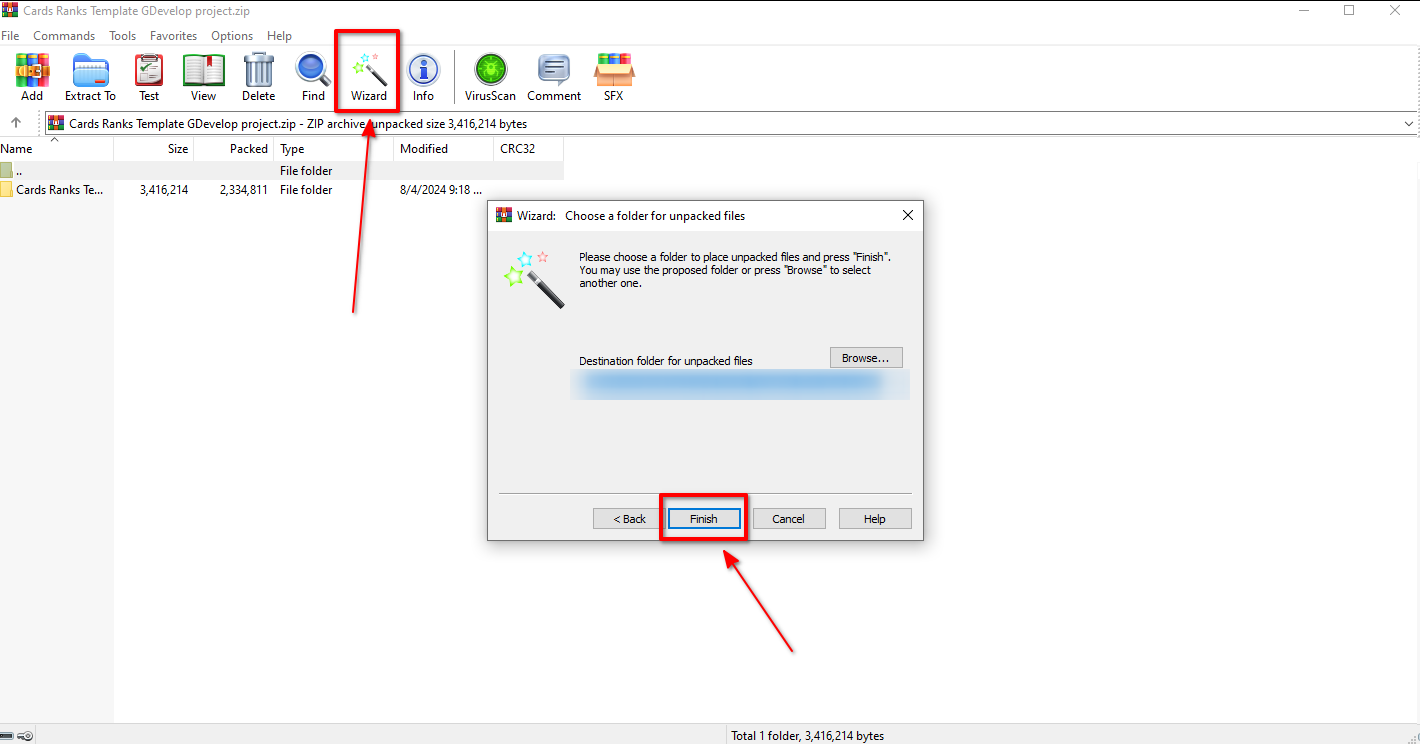
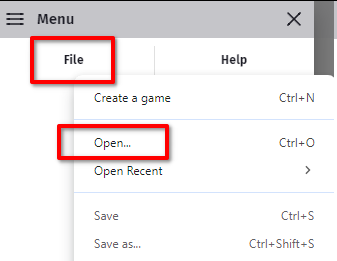
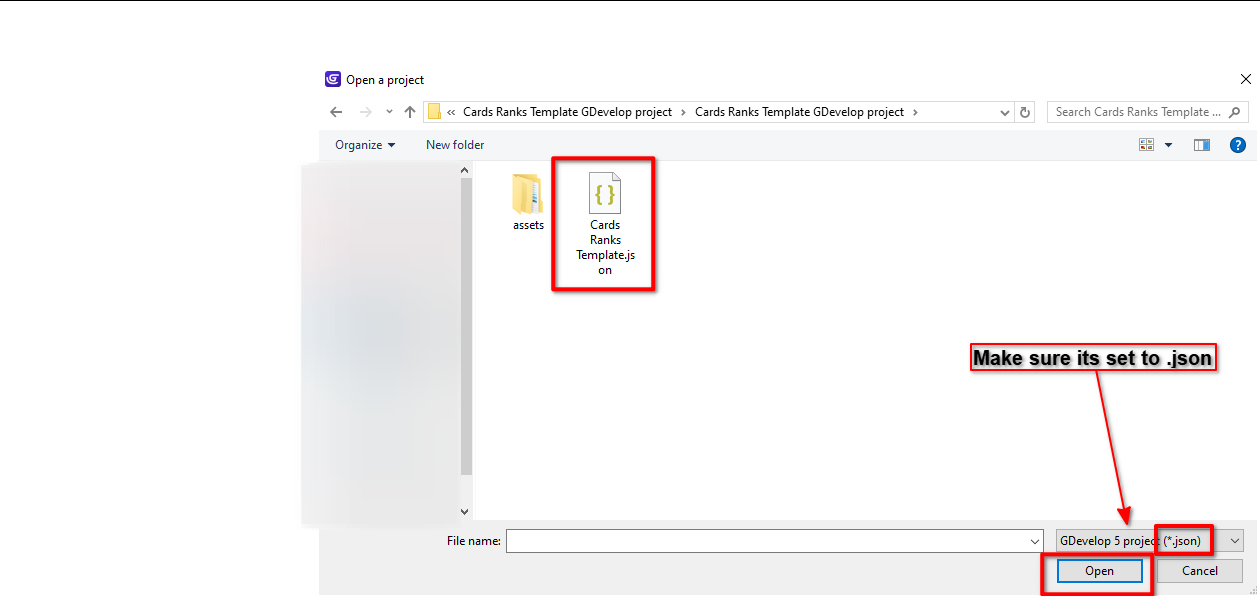
Here is screenshots showing you step by step how to do it :3

1- Unzipping the file

2- Opening the project in GDevelop


2-2

(1 edit)

Thank you for your purchase <3

Sure it does !
1- Download the template (you will get a .zip file).
2- Unzip the downloaded .zip file using WinRAR (or any unzip software).
3- Open GDevelop.
4-  In gdevelop press Ctrl+O or just click on file and open project.
5- Select the .json file that you got from unzipping the downloaded .zip file.
Done !

Your welcome <3

Sorry for the late response :D

There is no difference at all, both gd store and itch versions are identical, and both get latest updates as well!

The only difference is the price, it's a lil higher on gd store to cover the taxes % :)

Thank you for your support <3

Very happy you are satisfied with the extension :D

You dont need the gamepad platform mapper behavior, you just need the Gamepad extension, after that you use the condition.

It works fine to me
If it didn't work for you, then the gamepad extension maybe does not support your gamepad type, create a complete new empty project and test your gameapd in it with gameapd extension.

Hello, thank you for your purchase <3

You can easily add gamepad controls:

Open project manager (Hamburger button in the top left corner) → press on the + button beside the Extensions → search for Gamepads → click on Gamepads (controllers) and click on Install in project → now you can go to the Game scene events → Player mechanics → Movements + Attack → Move → Move left/right/down → and here you will find the movement conditions (using keyboard), you can replace them with gamepad conditions rather than keyboard, or you can add an OR and inside it you can put the keyboard condition + gamepad condition to make the game support both keyboard and gamepad.

Game events → Camera → look for the Enforce camera boundaries action, change the bottom from 360 to the number you want (999999 if you want infinite bottom).

Will take a look at your game once I get some free time :3

Hello :)

My templates and extensions uses gdevelop events not JS, no mechanics or systems are hidden inside behaviors or extensions, so anyone can check/copy any system/mechanic he wants.

Sorry, no bundles yet since the templates/extensions price is very cheap already :3

The maps are basically External tile map object in gdevelop (not the built-in one), so basically you only need Tiled software to edit the map and handle all the collisions easily from there :)

The template uses THNK-P2P extension for online multiplayer, P2P in general requires 1 player at less to open a lobby on his side, in P2P the host player is basically the server, if he leaves, the server will close, in order to make a room open forever, you actually need to host a paid server (there is many online) then connect it with gdevelop, the template currently doesn't support that :)

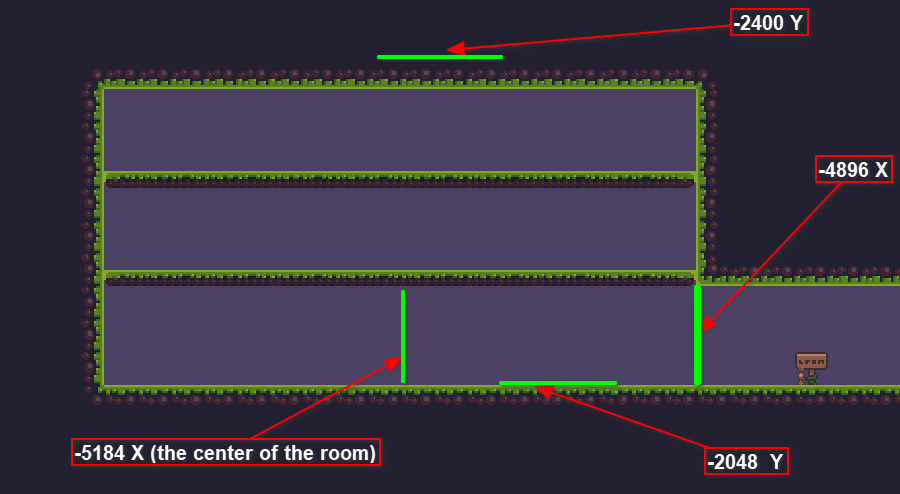
Game scene events → Bosses mechanics → Knife boss → Player enter boss area:
You need to change the numbers of the player position to the new numbers of the boss area, so numbers like

-4896 (Used to trigger the player entering boss room cutscene).
-2048 (Used to define the top side of the boss room).
-2400 (Used to define the bottom side of the boss room).
-5184 (Used to stop moving the player exactly in the center of the room during the cutscene).

All of them you need to change them, some for the X position and some for Y, just change them to your new boss area numbers :)
Take a look at this screenshot, this is the Knife boss area, look at the numbers, they are just returning the boss room numbers (X and Y position).


Hello :)
You can remove that limit, but i do not recommond doing it, because the game codes handles 7 players only currently, player 8 and above will break everything in the game, you will have to handle all players in the codes in order to make them not break the game rules.

Open the Lobby scene events → Server code event → Spawning players → A client has connected event → State.HowManyPlayersHasJoinedTheLobby → currently its 7, change that to the number of players you want. to be in the lobby.

(1 edit)

Hello :)

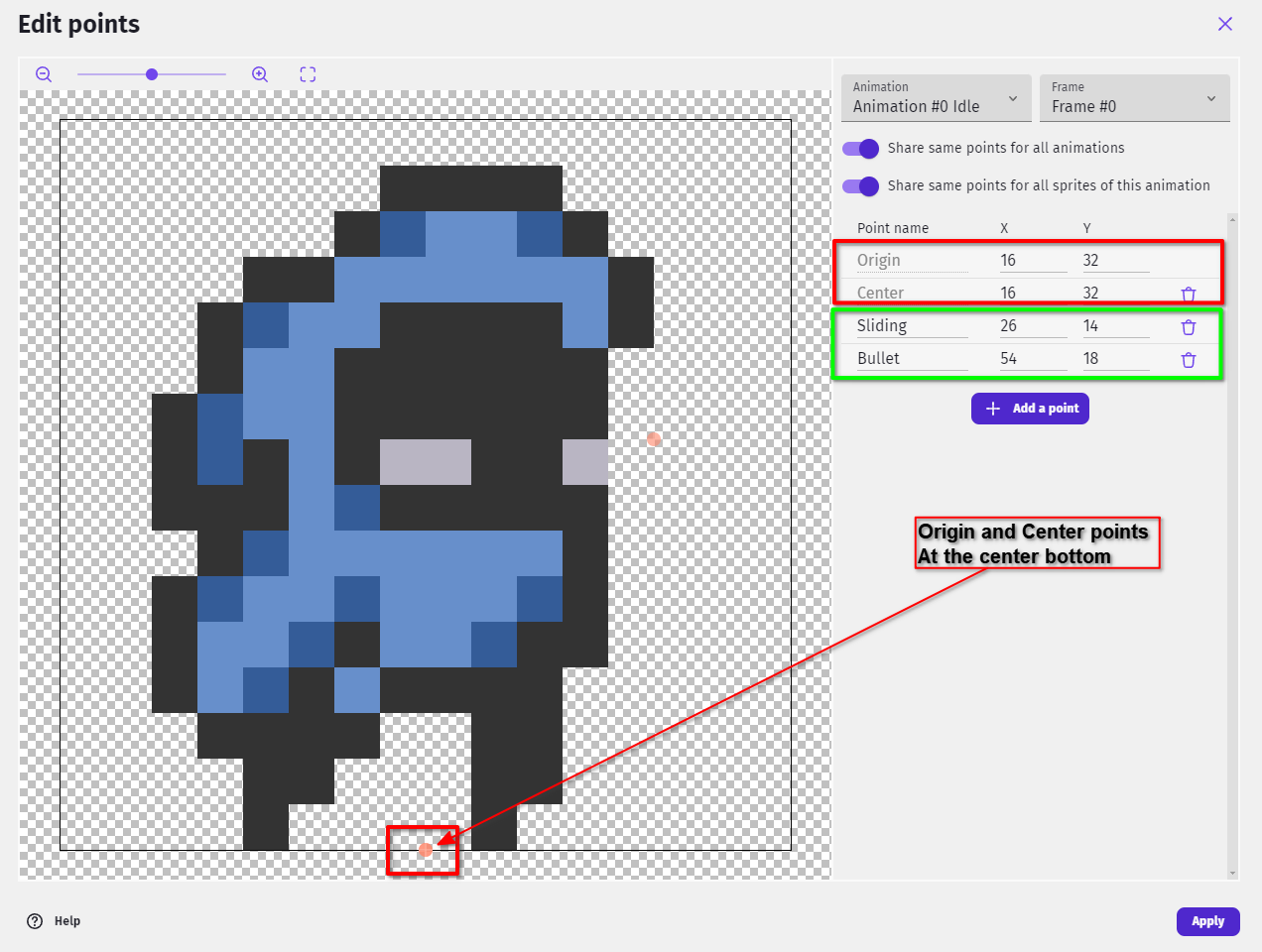
After replacing the old skin with the new one, you need to double-check that you have the Origin and Center points of the new skin, set at the center bottom (that's how the old skin also works):

Double-click on PlayerSkin object → Edit points → Change Origin and Center points to the very bottom center of the skin.
And make sure to add the Sliding and Bullet points as well (one used for particles and one used for Shooting bullet create position).